Explore a plant
Each question on this page names the Plant and the dates. Thus, you can ask each question alone, in a new chat. Replace the text in square brackets with your own details.
1. Find the Plant
Find [Plant name]. Show its code, timezone, and current status.
The assistant searches by Plant name or code. It cannot search by city. The service returns a canonical Plant identifier for later reads and checks that identifier against your signed-in access.
2. Choose a complete date window
Show daily yield, PR, availability, and irradiation at [Plant name] from [start date] to [end date]. State the timezone.
Use an explicit date range when you compare results. Use complete days. The assistant uses the Plant timezone.
3. Investigate an unusual result
Show daily performance at [Plant name] from [start date] to [end date]. Which day has the lowest PR? Show the yield, availability, and irradiation of that day.
A missing value is "no reported value". It is not zero. Ask the assistant to keep the Plant, date window, timezone, and coverage next to the result. This makes the answer easier to review.
See a chart in the chat
Ask for one day of power, yield, or performance as a chart:
Show the power chart for [Plant name] yesterday.
ChatGPT, Claude, and other AI tools that support MCP Apps show the chart in the conversation. You can hover to read a value and zoom into part of the day. The time axis uses the Plant's local time.
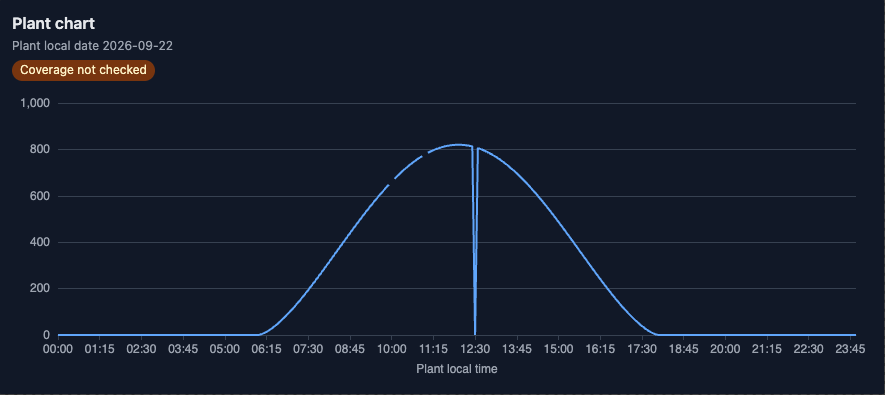
The chart shows the values that SolarSENS returns. SolarSENS can fill a missing value with 0 or with the previous value. A gap in the line shows only a missing timestamp. If the chart shows a "Coverage not checked" badge, the service did not check that day for missing data.
An AI tool that cannot show charts gets the same values as text.
Review performance
Ask whether the daily performance ratio (PR) of one Plant on one day is below its recent range:
Is the daily PR at [Plant name] on [date] below its range for the 7 days before? Show the values that you compared.
You can also select plant-performance-review as a prompt. Enter the Plant
name or code and the date as YYYY-MM-DD. See Guided checks.
The review compares the day with the 7 days before it. A low PR is a measured gap. The answer gives possible causes, not a confirmed cause. In the line below, D is the day of the review.
Not checked: work orders, DataHub, status as of D, device fault history.
Read only when you ask: alarm history, sub-day window.Compare Plants
Compare yesterday's yield and PR at [Plant name] and [Plant name]. Keep a missing value separate from zero.
The assistant reads each Plant that you name. It must not fill an inaccessible Plant by guessing its ID. Missing data is not the same as zero production.